
Start Worker
Method: POST
Endpoint: /api/v1/scraper/run
Send the request body with Content-Type: application/json.
Try it
Section titled “Try it”POST
/api/v1/scraper/runStart scraper runRequired
Stored only in this browser tab. Sent only to https://openapi.coreclaw.com.
BodyRequiredapplication/json
FieldTypeRequiredDescription
scraper_slugstringyesUnique scraper identifier.versionstringyesScraper version. Must be copied from `/api/scraper` -> `data.version`.is_asyncbooleanyes`true` returns immediately with `run_slug`; `false` performs a synchronous execution flow.inputobjectyescallback_urlstring—Webhook URL for async completion callbacks. Optional; include it when webhook orchestration is needed.Request body (JSON)
When to use this endpoint
Section titled “When to use this endpoint”Use this endpoint when you want to launch a Worker directly by its scraper_slug.
Where scraper_slug comes from
Section titled “Where scraper_slug comes from”scraper_slug is the Worker ID — a unique identifier for each Worker. Every Worker has one permanent scraper_slug.
You can find it:
- On the Worker detail page in CoreClaw Console
- From the
scraper_slugfield returned by Run Detail or Run History
Request Example
Section titled “Request Example”{ "scraper_slug": "YOUR_SCRAPER_SLUG", "version": "YOUR_WORKER_VERSION", "input": { "parameters": { "system": { "cpus": 0.125, "memory": 512, "execute_limit_time_seconds": 1800, "max_total_charge": 0, "max_total_traffic": 0, "proxy_region": "CH" }, "custom": { "startURLs": [ { "url": "https://example.com" } ] } } }, "callback_url": "https://your-callback.example.com/webhook", "is_async": true}Parameters
Section titled “Parameters”| Parameter | Required | Type | Description |
|---|---|---|---|
| scraper_slug | Yes | string | Worker ID — unique identifier for the Worker you want to run |
| version | Yes | string | Worker version |
| input | Yes | object | Input parameters |
| is_async | Yes | boolean | true: async execution (default), false: sync execution (waits for completion) |
| callback_url | No | string | Callback URL for receiving run results |
system Parameters
Section titled “system Parameters”| Parameter | Example | Type | Required | Description |
|---|---|---|---|---|
| proxy_region | US | string | No | Execution node (ISO 3166-1 alpha-2 country code). Common: US, CN, HK, JP, SG, DE, GB, FR. See Swagger definition for the full list of supported codes. |
| cpus | 0.125 | number | Yes | Container CPU cores |
| memory | 512 | integer | Yes | Container memory size in MB. Supported values: 512, 1024, 2048, 4096, 8192, 16384 |
| execute_limit_time_seconds | 1800 | integer | Yes | Container execution timeout in seconds |
| max_total_charge | 0 | integer | Yes | Maximum charge in USD |
| max_total_traffic | 0 | integer | Yes | Maximum traffic in MB |
custom Parameters
Section titled “custom Parameters”input.parameters.custom is not a fixed schema — it varies per Worker. Use one of these approaches to find the exact fields:
- API: Call
GET /api/scraper?slug=<scraper_slug>and readdata.parameters.customfrom the response. Each entry inproperties[]maps to a field ininput.parameters.custom. - Console: Open the Worker in the CoreClaw Console, go to the Input tab, click the API button in the top-right corner, and select API clients to view ready-to-use code snippets.
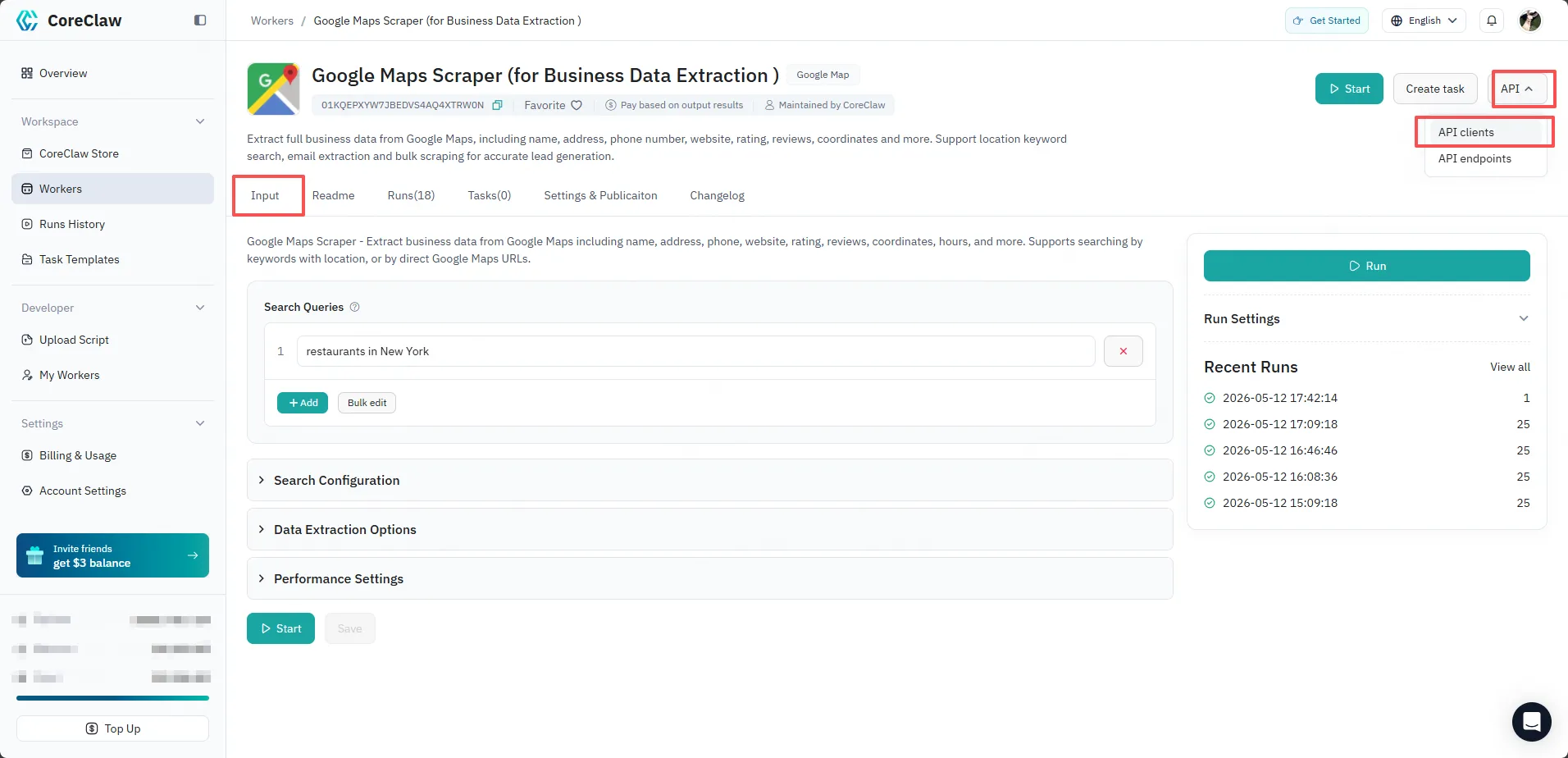
When building custom:
- Use each
properties[].nameas the key - Match the declared
type, nested structure, and array shape - Provide all fields where
required: true - An empty or schema-mismatched
customobject returns400 Bad Request
How to get version
Section titled “How to get version”You can get the Worker version from:
- the Worker page
- the
versionfield returned by Run Detail - the
versionfield returned by Run History
Validation behavior
Section titled “Validation behavior”callback_urlis optional for this endpoint. It is required for/api/v1/task/runand/api/v1/rerun.- Do not pass a
run_slug(Run Record ID) ortask_slug(Task ID) toscraper_slug— each slug type is different and not interchangeable. - Providing only generic
systemparameters is not enough if the Worker requirescustomfields defined by its descriptor.
Response Example
Section titled “Response Example”{ "code": 0, "message": "success", "data": { "run_slug": "01KSFDS8XWTJME33C08XMCR6B9" }}Response Fields
Section titled “Response Fields”| Parameter | Example | Type | Description |
|---|---|---|---|
| code | 0 | Integer | Global status code |
| message | success | String | Response message |
| data | - | Object | Response payload |
| run_slug | 01KSFDS8XWTJME33C08XMCR6B9 | String | Run Record ID — unique identifier for this execution |