
API Calls
Learn how to launch Workers, run Task templates, and inspect runs programmatically using CoreClaw API v2.
Getting Started
Section titled “Getting Started”Authentication
Section titled “Authentication”The API v2 base URL is:
https://openapi.coreclaw.comAuthenticated endpoints support Bearer token, the legacy api-key header, and query token. New integrations should prefer Bearer token:
curl -X GET "https://openapi.coreclaw.com/api/v2/users/account" \ -H "Authorization: Bearer YOUR_API_KEY"Get your API key from the CoreClaw Console.
For the full endpoint reference, see Base URL & Authentication.
Identifier Types
Section titled “Identifier Types”| Identifier | What it identifies | How to get it | Used by |
|---|---|---|---|
workerId | A Worker | Use the Worker slug, or encode a path such as coreclaw/google-maps-scraper as coreclaw~google-maps-scraper. You can get it from Store search or your Worker list. | /api/v2/workers/{workerId}, /api/v2/workers/{workerId}/runs |
workerTaskId | A saved Task template | Generated when a user creates and saves a Task template. | /api/v2/worker-tasks/{workerTaskId}/runs |
runId | A specific run record | Returned as data.run_slug after starting or rerunning a Worker or Task. | /api/v2/worker-runs/{runId}, /api/v2/worker-runs/{runId}/result, /api/v2/worker-runs/{runId}/result/export |
Do not mix these identifiers. Passing a runId where a workerId or workerTaskId is expected results in request validation errors.
Start a Worker run
Section titled “Start a Worker run”POST /api/v2/workers/{workerId}/runsRequest body:
{ "input": { "parameters": { "custom": { "keywords": ["coffee"], "base_location": "New York,USA", "max_results": 1 } } }, "is_async": true, "callback_url": "https://your-callback.example.com/webhook"}is_async controls whether the run executes asynchronously: true submits and returns immediately; false waits for the synchronous result window. When the request returns, save both data.run_slug as runId and request_id for follow-up and troubleshooting. Provide callback_url when you need webhook delivery of status updates.
input varies per Worker. It is not the old custom_params JSON string field. Read the Worker schema before constructing the payload:
- API: Call
GET /api/v2/workers/{workerId}/input-schemaand buildinputfrom the returned schema. - Console: Open the Worker in the CoreClaw Console, go to the Input tab, click the API button in the top-right corner, and select API clients to view ready-to-use code snippets.
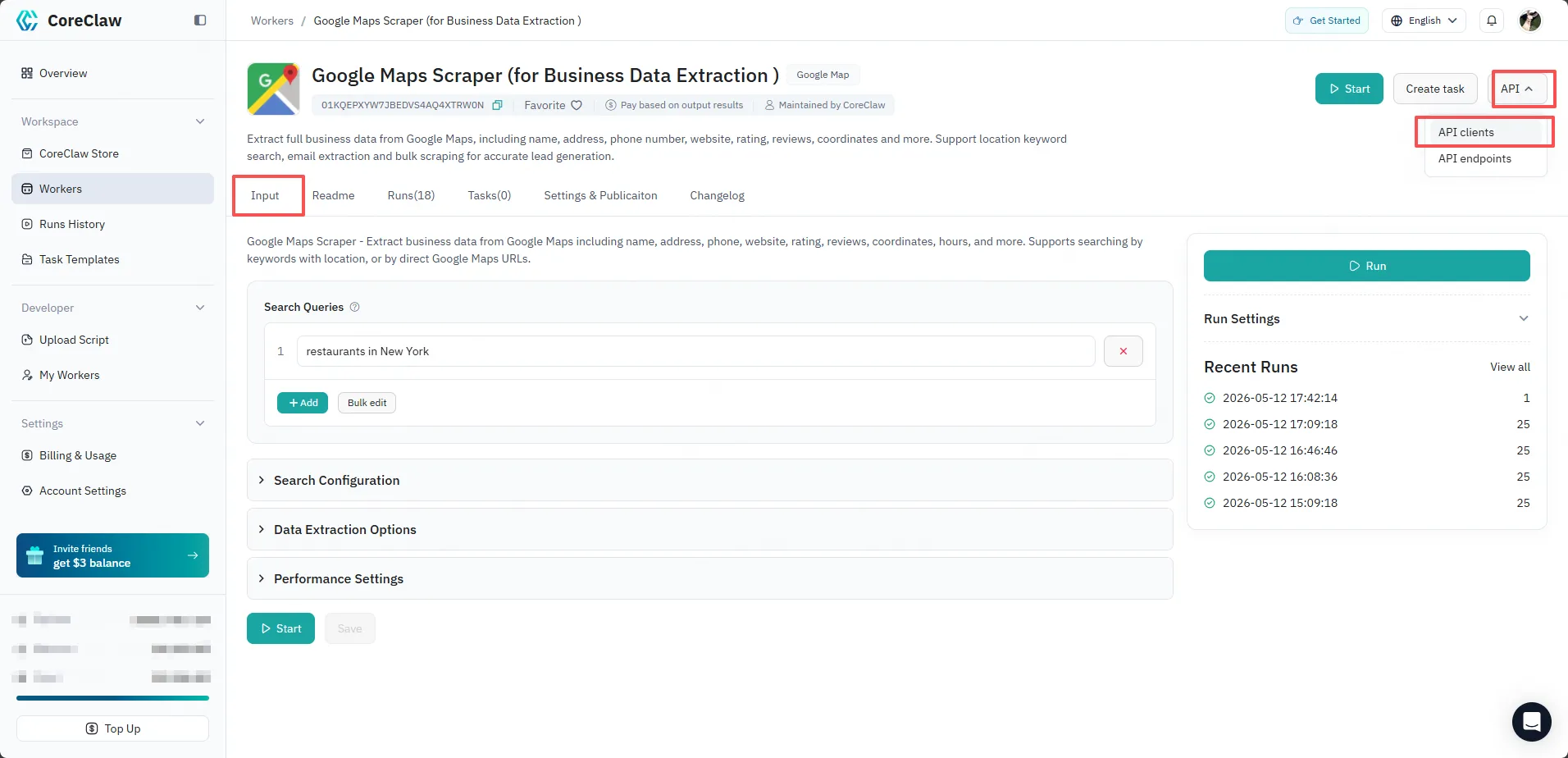
When building input:
- Follow the Worker input schema exactly.
- Put Worker form fields under
input.parameters.customunless that Worker’s schema explicitly says otherwise. - Provide every required field.
- Keep
limitat100or lower when using synchronous result pagination. - If
inputis missing or does not match the Worker schema, the API returns a validation error.
How to get version
Section titled “How to get version”version is optional. If omitted, the platform uses the latest version automatically. To pin a specific version, use the Worker version shown in the Console or the version field returned by Run Detail.
Run a saved Task template
Section titled “Run a saved Task template”POST /api/v2/worker-tasks/{workerTaskId}/runsRequest body:
{ "is_async": true, "callback_url": "https://your-callback.example.com/webhook"}Task templates already contain their saved input settings. Use callback_url when you need webhook delivery, and use the returned data.run_slug as the runId for follow-up calls.
Inspect a run
Section titled “Inspect a run”Use the returned runId with the run APIs. Check data.status as the primary outcome field; results, timestamps, and err_msg are supporting diagnostics, not substitutes for status. Use bounded backoff while status is ready or running; on succeeded, read results or export; on failed, preserve request_id and inspect detail plus logs; after an abort request, re-read that same concrete runId and handle the documented aborting state rather than inventing aborted.
For the contract-supported states, real response shapes, polling sequence, and cancellation caveats, see Run Lifecycle & Status.
Use the returned runId with the run APIs:
- Run Detail for status, Worker, and version.
- Run Log for execution logs.
- Run Result List for paginated results.
- Export Run Result for file export.
Concurrency limits when calling the API
Section titled “Concurrency limits when calling the API”Each plan limits how many runs can execute at the same time. When you start runs programmatically — especially in batches or loops — respect this limit to avoid rejections:
- The limit counts only runs in the
runningstate;succeeded,failed, and cancelled runs do not count. See Concurrency Limits for the per-plan numbers. - If a start-run request is rejected because you are at the limit, the response carries a descriptive message and no run is created — no Run ID, no balance deducted, no run quota consumed.
- Handle this case explicitly: back off (wait for an active run to finish, or poll run status until a slot frees up) and retry the start request. Do not hammer the endpoint in a tight loop, or you risk
429rate-limiting on top of the concurrency rejection. - For batch workloads, either queue runs client-side and keep at most
Nin-flight (whereNis your plan’s concurrency), or useis_async: trueand a bounded worker pool.
Common mistakes
Section titled “Common mistakes”- Using old v1 paths instead of the v2 resource paths.
- Sending
system_paramsorcustom_paramsas stringified JSON. - Passing a
runIdwhere aworkerIdorworkerTaskIdis required. - Omitting required Worker-specific
inputfields. - Treating
lastrun endpoints as stable references when a concreterunIdis available.