
Worker Input Configuration (Input Schema)
This document explains how developers should configure the input_schema.json file. This file determines the input form layout presented to users in the web interface of an automation Worker.
🛠️ Input Schema User Guide
Section titled “🛠️ Input Schema User Guide”input_schema.json is the “face” of your script. By editing this file, you can control which parameters users must fill in before launching the script, such as URLs, keywords, dates, and more, as well as how those fields are displayed, such as dropdowns, checkboxes, and text inputs.
1. Overall Structure
Section titled “1. Overall Structure”A standard configuration file consists of the following three parts:
- description: Introduces the script’s purpose and usage to the user.
- b: The concurrency key field that determines how the script splits tasks.
- properties: The list of specific parameter settings.
Core Example
Section titled “Core Example”{ "description": "With our Instagram Reel information Worker tool, after a successful scrape, you can extract the Reel author's username, Reel caption, hashtags used in the post, number of comments on the Reel, Reel publish date, likes count, views count, play count, popular comments, unique post identifier, URL of the Reel's display image or video thumbnail, product type, Reel duration, video URL, post audio link, number of posts on the profile, number of followers on the profile, profile URL, whether the account is a paid partner, and other relevant information. Currently, the tool can scrape via Instagram username, URL, and other methods, and the scrape results can be downloaded in various structured formats.", "b": "startUrl", "properties": [ { "title": "URL", "name": "startUrl", "type": "array", "editor": "requestList", "description": "This parameter is used to specify the Instagram access URL to be fetched.", "default": [ { "url": "https://www.instagram.com/reel/C5Rdyj_q7YN/" }, { "url": "https://www.instagram.com/reel/C85BZjeSHuO" } ], "required": true } ]}Output Example: Input
Section titled “Output Example: Input”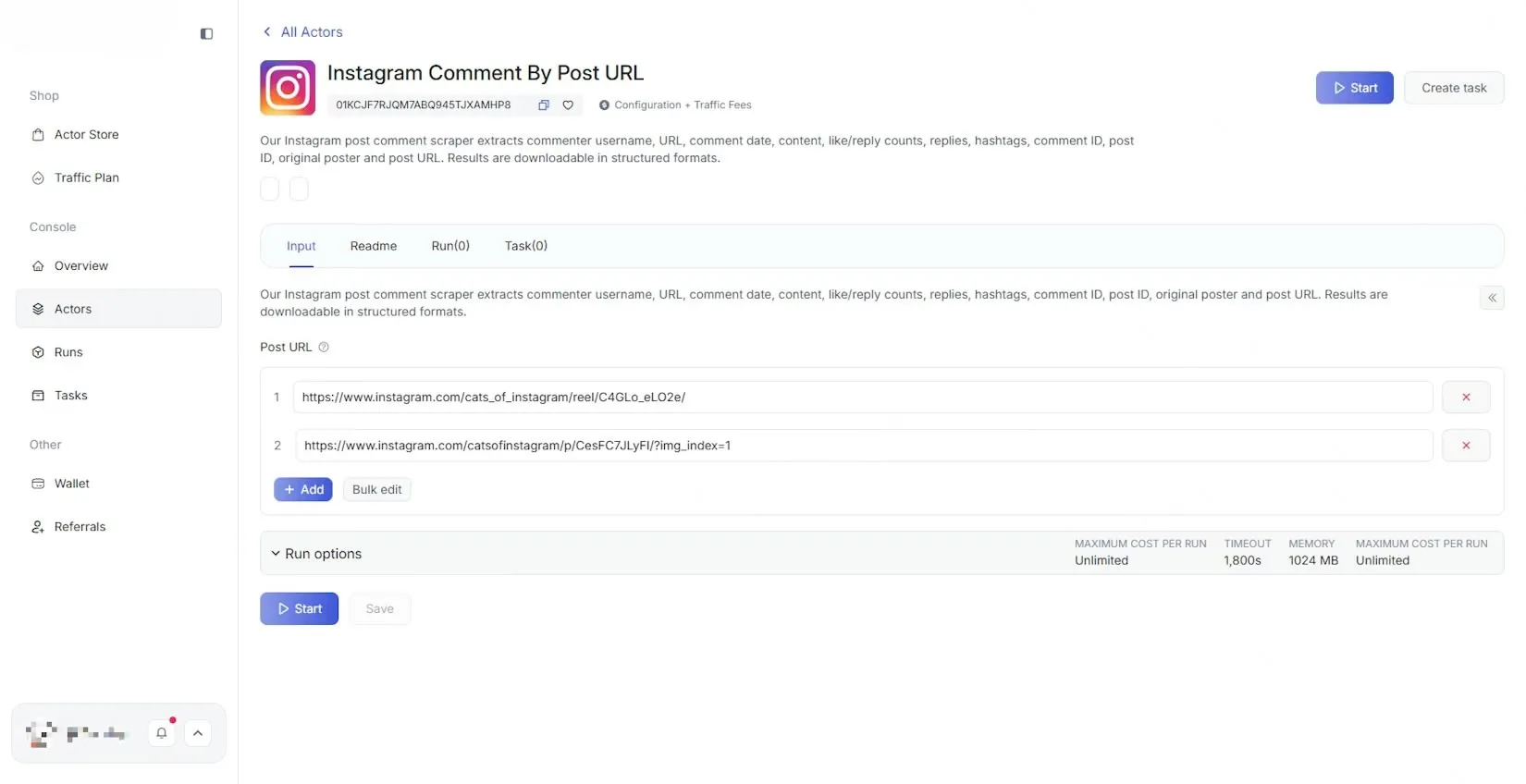
2. Key Root Fields
Section titled “2. Key Root Fields”| Field Name | Required | Description |
|---|---|---|
| description | No | Tool summary. Displayed at the top of the page. You can use it to describe the script’s purpose, notes, and more. There is no length limit. |
| b | Yes | Task splitting key. This must match the name of one element inside properties. The script uses this field for concurrent processing, for example, splitting tasks by the number of URLs. |
| properties | Yes | Parameter configuration array. This contains all input items, and each element represents one input field or selector on the page. |
3. Property Details Inside properties
Section titled “3. Property Details Inside properties”Each input item can contain the following settings:
- title: The label displayed on the page, for example, “Search Keywords”.
- name: The internal ID used by the program. It must be unique and cannot contain Chinese characters.
- type:
string: textinteger: numberboolean: switch (true/false)array: list / multi-selectobject: object
- editor: Determines which form control is used to render the input item in the web interface. See the table below.
- description: Helper text shown below the input field to guide the user.
- default: The initial displayed value or option.
- required: If set to
true, the script cannot be started unless the user fills in this field.
4. Editor Type Guide
Section titled “4. Editor Type Guide”You can choose different editor types based on your needs to improve the user experience.
1. Basic Text and Number Inputs
Section titled “1. Basic Text and Number Inputs”| Type Value | UI Form | Common Use Cases |
|---|---|---|
| input | Single-line input | Short text, keywords, account names |
| textarea | Multi-line textbox | Notes, long text descriptions |
| number | Number input | Limits, page numbers, wait seconds |
2. Selectors
Section titled “2. Selectors”| Type Value | UI Form | Example Use Cases |
|---|---|---|
| select | Dropdown | Gender, language, region |
| radio | Radio group | One-of-two or one-of-three choices |
| checkbox | Checkbox set | Select multiple tags of interest |
| switch | Toggle switch | Enable or disable an option |
3. Date and Special List Inputs
Section titled “3. Date and Special List Inputs”| Type Value | UI Form | Common Use Cases |
|---|---|---|
| datepicker | Date picker | Filter by a specific publish date |
| requestList | URL list | Batch input for page links to scrape, with Excel-style import support |
| requestListSource | URL request source | Allows additional custom parameters |
| stringList | String list | Batch input for multiple keywords |
5. Common Component Examples
Section titled “5. Common Component Examples”1. Single-line Input (input)
Section titled “1. Single-line Input (input)”{ "title": "📍 Location (use only one location per run)", "name": "location", "type": "string", "editor": "input", "default": "New York, USA"}
2. Multi-line Textarea (textarea)
Section titled “2. Multi-line Textarea (textarea)”{ "title": "Filter reviews by keywords", "name": "keywords", "type": "string", "editor": "textarea"}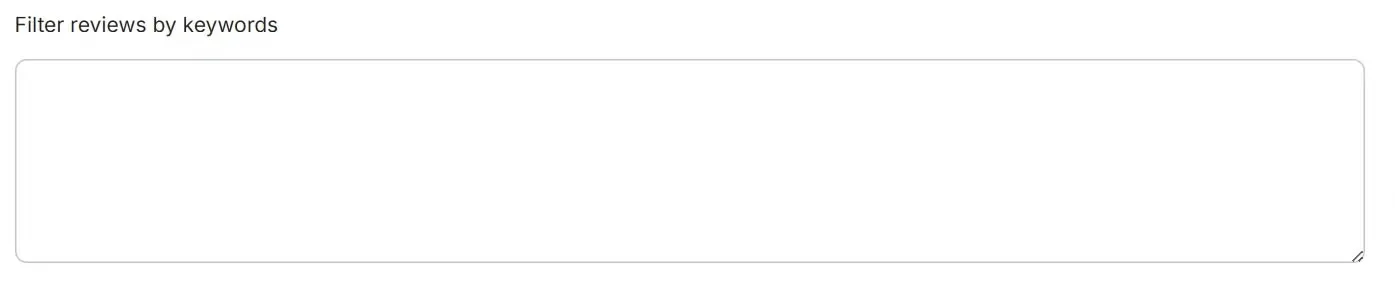
3. Number Input (number)
Section titled “3. Number Input (number)”{ "title": "Number of places to extract (per each search term or URL)", "name": "maxPlacesPerSearch", "type": "integer", "editor": "number", "default": 4}
4. Dropdown (select)
Section titled “4. Dropdown (select)”{ "title": "🌍 Language", "name": "language", "type": "string", "editor": "select", "options": [ { "label": "English", "value": "en" }, { "label": "Afrikaans", "value": "af" }, { "label": "azərbaycan", "value": "az" } ], "default": "en"}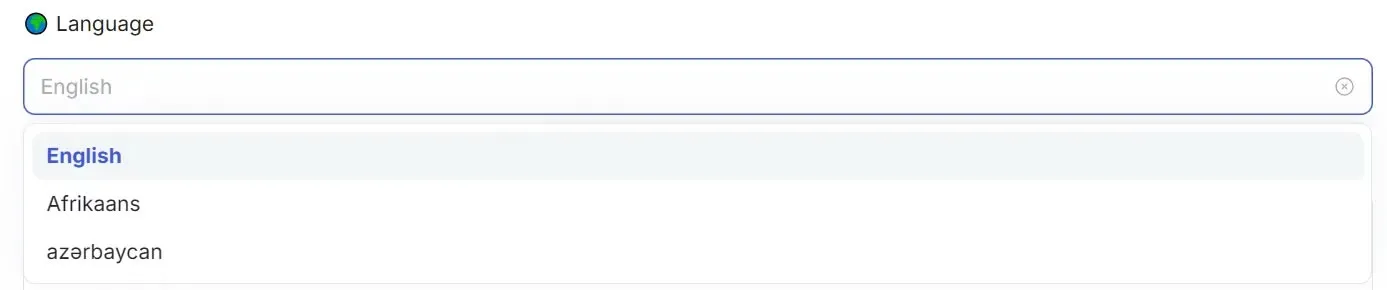
5. Radio Group (radio)
Section titled “5. Radio Group (radio)”{ "title": "🏢 Category", "name": "radio", "type": "integer", "editor": "radioGroup", "options": [ { "label": "hotel", "value": 1 }, { "label": "restaurant", "value": 2 } ], "default": 1}
6. Checkbox Group (checkbox)
Section titled “6. Checkbox Group (checkbox)”{ "title": "Data Sections to Scrape", "name": "data_sections", "type": "array", "editor": "checkboxGroup", "options": [ { "label": "Reviews", "value": "reviews" }, { "label": "Address", "value": "address" }, { "label": "Phone Number", "value": "phone_number" } ], "default": ["reviews", "address"]}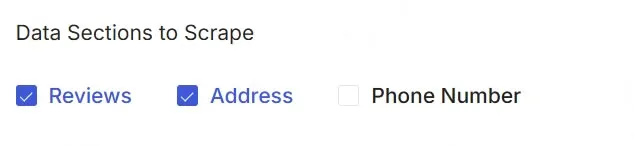
7. Date Picker (datepicker)
Section titled “7. Date Picker (datepicker)”{ "title": "📅 Extract posts that are newer than", "name": "date", "type": "string", "editor": "datepicker", "format": "DD/MM/YYYY", // Controls the display format shown in the input field (optional) "valueFormat": "DD/MM/YYYY" // Controls the format of the bound value (optional)}
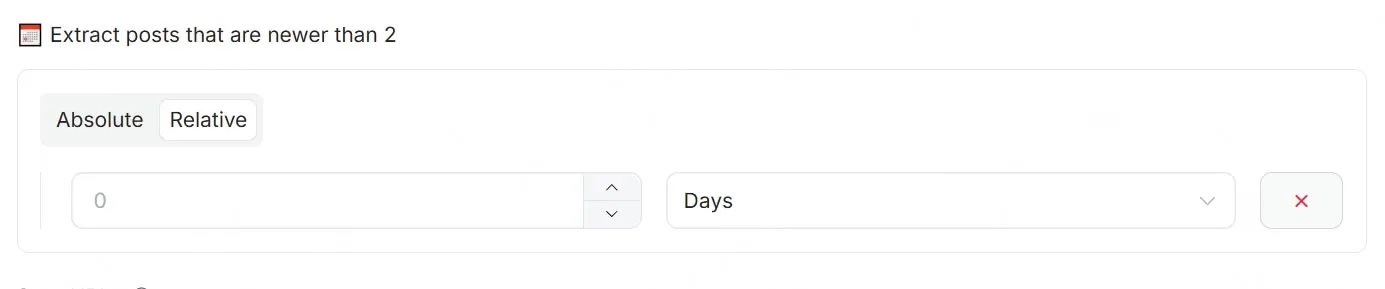
// editor:"datepicker"// dateType: 'absoluteOrRelative'{ "title": "📅 Extract posts that are newer than", "name": "date", "type": "string", "editor": "datepicker", "dateType": "absoluteOrRelative"}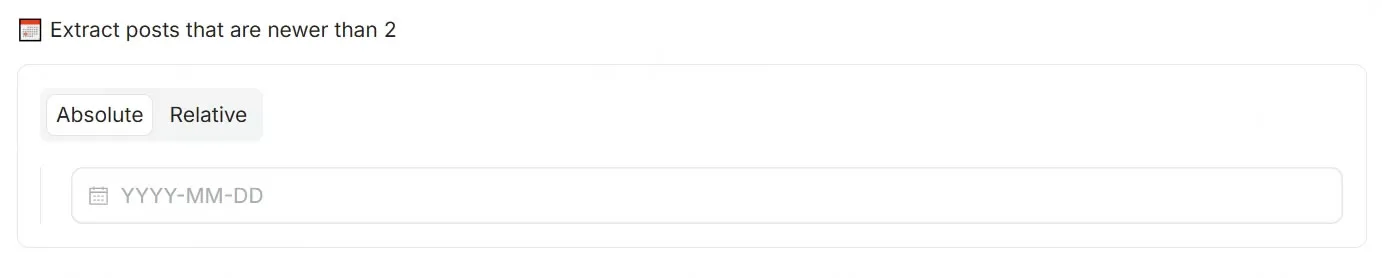
8. Toggle Switch (switch)
Section titled “8. Toggle Switch (switch)”{ "title": "⏩ Skip closed places", "name": "skipClosed", "type": "boolean", "editor": "checkbox"}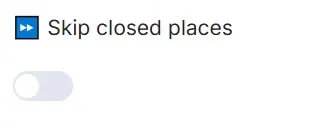
9. URL List (requestList)
Section titled “9. URL List (requestList)”{ "name": "startURLs", "type": "array", "title": "Start URLs", "editor": "requestList", "default": [ { "url": "https://www.google.com/search?sca_esv=593729410&q=Software+Engineer+jobs&uds=AMIYvT8-5jbJIP1-CbwNj1OVjAm_ezkS5e9c6xL1Cc4ifVo4bFIMuuQemtnb3giV7cKava9luZMDXVTS5p4powtoyb0ACtDGDu9unNkXZkFxC0i7ZSwrZd_aHgim6pFgOWgs0dte0pnb&sa=X&ictx=0&biw=1621&bih=648&dpr=2&ibp=htl;jobs&ved=2ahUKEwjt-4-Y6KyDAxUog4kEHSJ8DjQQudcGKAF6BAgRECo" }, { "url": "https://www.google.com.hk/search?q=software+engineer+salary&newwindow=1&sca_esv=593729410&biw=1588&bih=1273&ei=vEtOadCxI-3AkPIP952z0Qc&oq=Software+Engineer&gs_lp=Egxnd3Mtd2l6LXNlcnAiEVNvZnR3YXJlIEVuZ2luZWVyKgIIAjIKEAAYgAQYQxiKBTIFEAAYgAQyBRAAGIAEMgUQABiABDIFEAAYgAQyBRAAGIAEMgUQABiABDIFEAAYgAQyBRAAGIAEMgUQABiABEj2yQFQ0TFYlbEBcAR4AZABBJgBkwOgAbUXqgEHMi0zLjQuMrgBA8gBAPgBAZgCBqACiAWoAgPCAgoQABiwAxjWBBhHwgIgEAAYgAQYtAIY1AMY5QIY5wYYtwMYigUY6gIYigPYAQGYAwTxBcFiu8bFvIEOiAYBkAYKugYECAEYB5IHCTQuMC4xLjAuMaAHvy6yBwcyLTEuMC4xuAf1BMIHAzItNsgHGIAIAA&sclient=gws-wiz-serp" } ], "required": true, "description": "The URLs of the website to scrape"}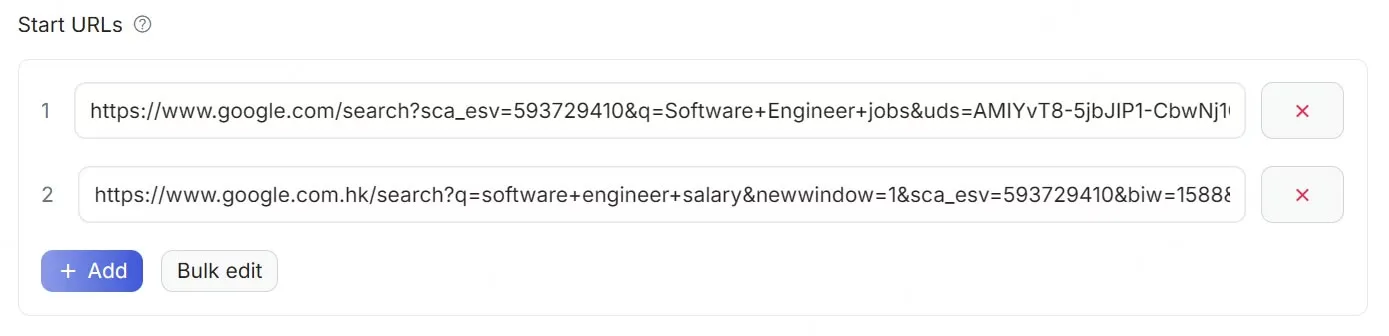
10. URL Request Source (requestListSource)
Section titled “10. URL Request Source (requestListSource)”{ "title": "startURLs", "name": "url", "type": "array", "editor": "requestListSource", "default": [ { "url": "https://www.instagram.com/espn", "end_date": "", "start_date": "", "num_of_posts": "10", "posts_to_not_include": "" } ], "param_list": [ { "param": "url", "title": "URL", "editor": "input", "type": "string", "required": true, "description": "This parameter is used to specify the Instagram access URL to be fetched." }, { "param": "num_of_posts", "title": "Maximum Number of Reels", "type": "integer", "editor": "number", "description": "This parameter is used to specify the maximum number of Reels to fetch." }, { "param": "start_date", "title": "Start Date", "type": "string", "editor": "datepicker", "format": "MM-DD-YYYY", "valueFormat": "MM-DD-YYYY", "description": "This parameter is used to specify the start time of the post, format: mm-dd-yyyy, and should be earlier than the \"end_date\"." }, { "param": "end_date", "title": "End Date", "type": "string", "editor": "datepicker", "format": "MM-DD-YYYY", "valueFormat": "MM-DD-YYYY", "description": "This parameter is used to specify the end time of the post, format: mm-dd-yyyy, and should be later than the \"start_date\"." } ], "description": "The URLs of the website to scrape"}
11. String List (stringList)
Section titled “11. String List (stringList)”{ "title": "🔍 Search term(s)", "name": "searchTerms", "type": "array", "editor": "stringList", "default": [ { "string": "restaurant" }, { "string": "school" } ]}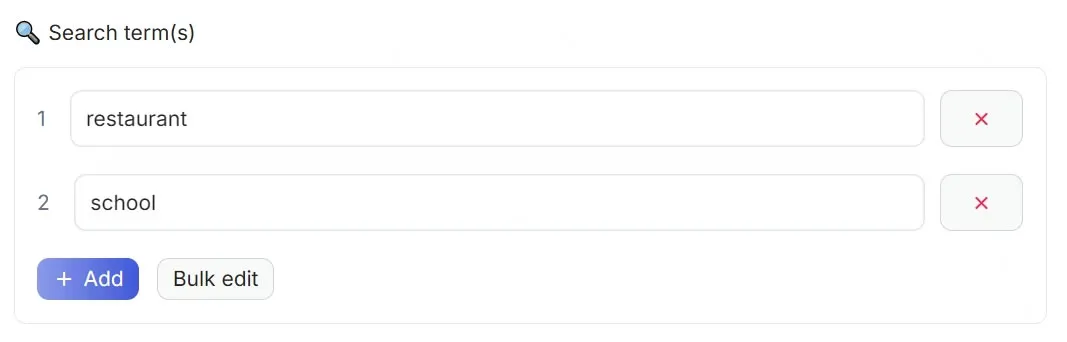
📚 Grouped Configuration
Section titled “📚 Grouped Configuration”Developers can logically group multiple configuration items by using specific fields. When there are many configuration items, grouping improves readability and maintainability, helping users locate and understand the settings more easily.
| Parameter | Example Value | Type | Required | Description |
|---|---|---|---|---|
| sectionCaption | - | String | No | Defines the display title of a group. When this property appears in a configuration item, it is treated as the start of a new group. |
| sectionDescription | - | String | No | Adds extra explanation for the current group and provides more detailed context. |
Example
Section titled “Example”{ "description": "🔍 Find usernames across 400+ social networks. Check if a username is available or already taken on various platforms.", "b": "username", "properties": [ { "title": "Username", "name": "username", "type": "array", "editor": "stringList", "description": "Username(s) to search. One per line.", "default": [ { "string": "john_doe" } ], "required": true }, { "title": "Timeout (secs)", "name": "timeout", "type": "integer", "editor": "number", "description": "Request timeout in seconds per site.", "default": 30, "sectionCaption": "🧩 Request control and result settings", "sectionDescription": "Configure the performance parameters of the crawler requests (such as timeout and concurrency), and control the filtering rules and output range of search results." }, { "title": "Concurrency", "name": "maxConcurrency", "type": "integer", "editor": "number", "description": "Maximum concurrent requests.", "default": 20 }, { "title": "Include NSFW", "name": "includeNsfw", "type": "boolean", "editor": "switch", "description": "Include adult content sites in search.", "default": false }, { "title": "Show All Results", "name": "printAll", "type": "boolean", "editor": "switch", "description": "Show all results including not found.", "default": false }, { "title": "Specific Sites", "name": "sites", "type": "array", "editor": "requestList", "description": "Only check these sites (empty = all sites).", "default": [], "sectionCaption": "🔗 Target site restrictions?", "sectionDescription": "Configure the specific list of websites to be checked. If the list is empty, all available sites will be checked by default." } ]}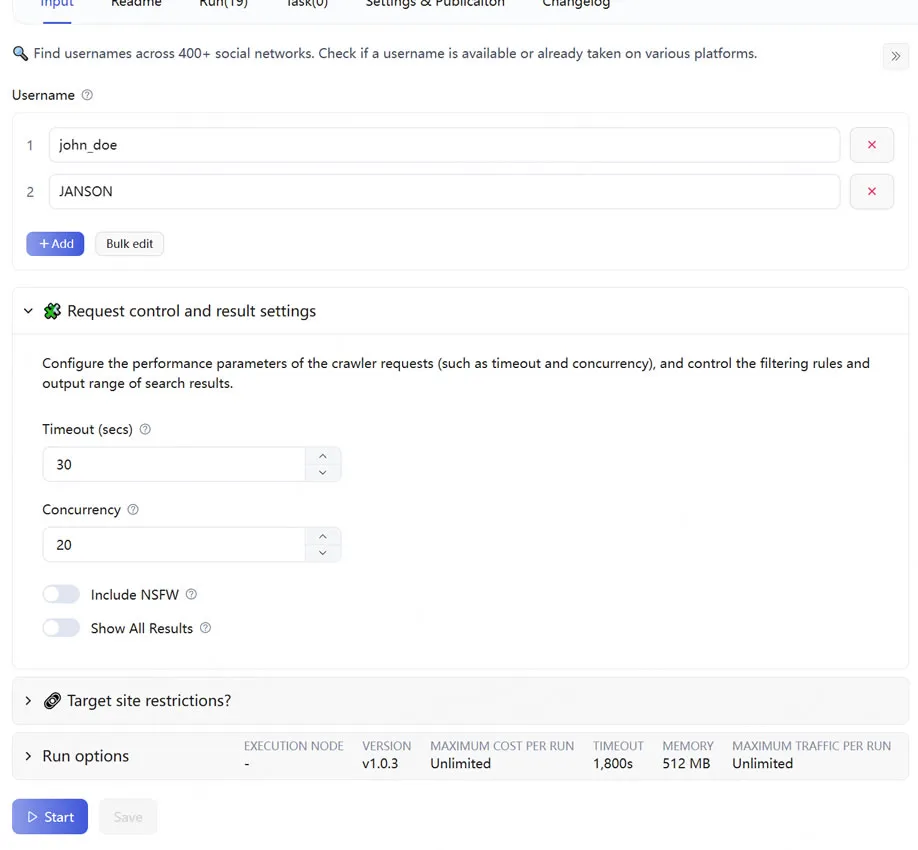
💡 Configuration Tips
Section titled “💡 Configuration Tips”- Write clear descriptions: Make sure
descriptionis clear and accurate. This helps your script get discovered by more target users. - Set sensible defaults: A reasonable
defaultvalue lets users run the script immediately and greatly lowers the barrier to entry. - Validate required fields: For parameters without which the script cannot run, such as login cookies or the main URL, be sure to set
"required": true.